

Cango logo
Smartphone displaying a colorful casino game with orange neon glow on dark surface, blurred night city bokeh background

Cango Online Pokies NZ: online pokies in the browser explained

Updated: 10 November 2026

Navigating the Cango online pokies NZ catalogue starts with knowing how the lobby organises its hundreds of reel games across desktop browsers and mobile screens. Kiwi players who open Can Go Casino find a layout built around quick category tabs, seven themed collections, and a prominent provider filter dominated by BGaming’s 277 titles and Thunderspin’s 60 releases. Every pokie in the main lobby runs directly in HTML5 without plugins, offering an instant demo button alongside real-money stakes. This guide maps out how online play works across devices, how to switch from test spins to funded rounds, and where the search tools sit.

Cango online pokies NZ: online play in one table

Before spinning any reels, it helps to see how the platform behaves across different screens and operating systems. The lobby does not require a heavy software download from an app store; instead, it relies on modern mobile and desktop browsers or a lightweight progressive web app shortcut.

DeviceHow to playWhat you need
Desktop or laptop (Windows, macOS)Open the site directly in Chrome, Safari, Edge, or Firefox and launch any game tile in the browser windowStable broadband connection, updated browser, registered account for cash play
iPhone and iPad (iOS)Play in Mobile Safari or tap the Share icon and select Add to Home Screen to install the PWA shortcutiOS device with Safari, mobile data or Wi-Fi, 8+ character password login
Android phones and tabletsLaunch in Chrome or open the browser menu and tap Install app / Add to Home screen for the web appAndroid browser, active internet connection, verified account for cashouts
Demo mode on any deviceHover over or tap a pokie thumbnail in the lobby and select the Play demo buttonNo deposit required, runs on a virtual test balance in your browser

Reading this setup shows that the core Cango online slots experience remains identical whether you sit at a desktop monitor or hold a phone on the couch. Because the games run on server-side HTML5 engines from studios like BGaming, Thunderspin, Booongo, and Playson, the math model, average 95-97% RTP, and bonus features do not change between devices. The only adjustment on smaller screens is the user interface: spin buttons shift to the right thumb zone, and paytables collapse into a compact info menu marked with an (i) icon.
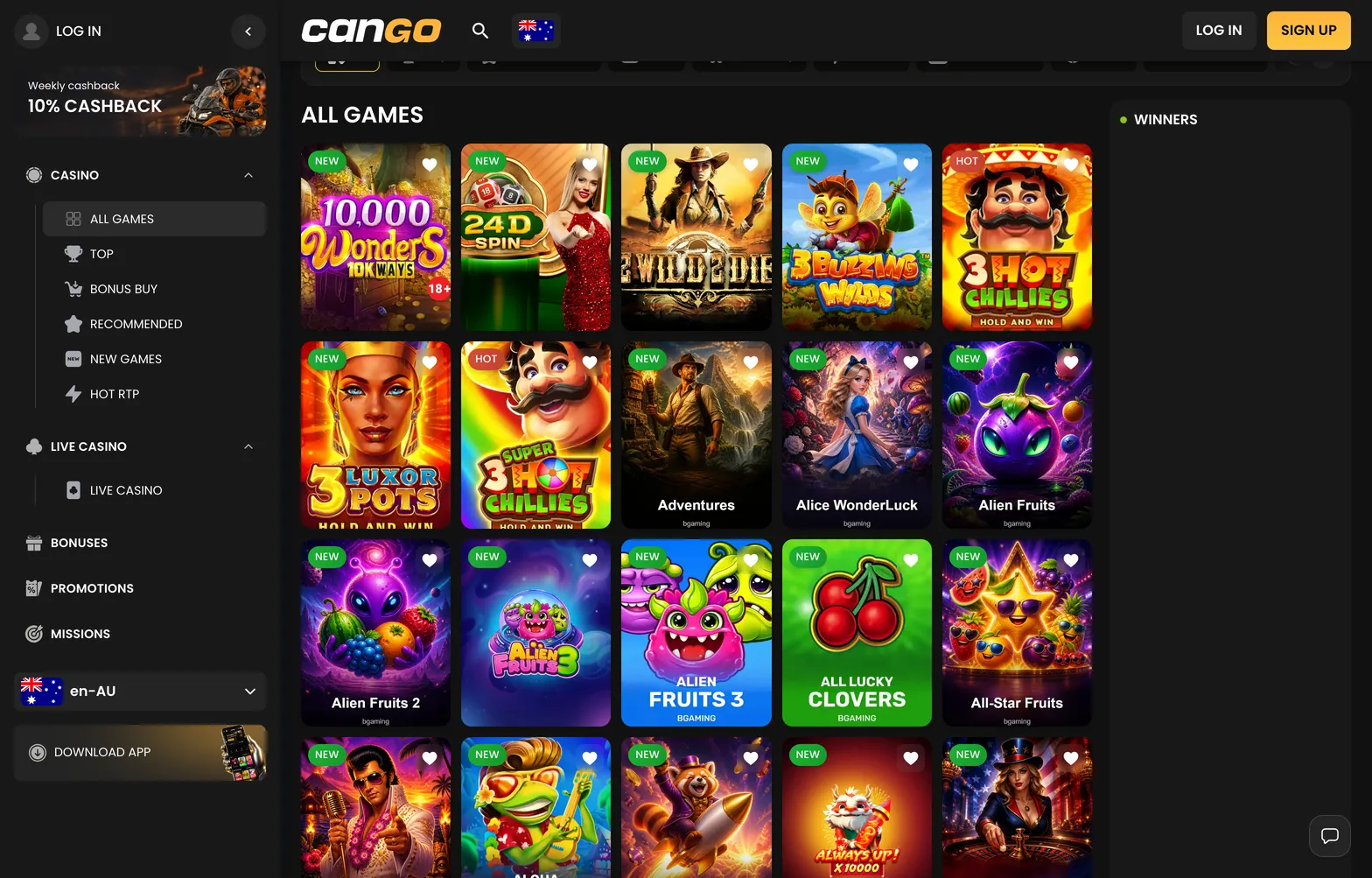
In the browser the lobby looks the same as on desktop: category chips, search and Play demo on every pokie tile.

Categories all 002 cango 1568x1003

Cango online slots: going from free to paid

Every pokie in the lobby carries a Play demo option right on its cover tile. Tapping that button loads the game with a virtual credit balance, allowing you to test the volatility, check the exact RTP percentage inside the (i) window, and see how features like Hold and Win or Megaways behave before risking your own funds. When you switch from Play demo to the real-money button on the exact same title, say Elvis Frog TRUEWAYS, 3 Hot Chillies, or Gold Express, the game connects to the exact same remote game server. The reel strips, hit frequency, and bonus triggers are identical between free mode and paid play.

Moving to paid spins requires an active account and a cashier deposit. Registration takes one short form where you enter your email, create a password of at least 8 characters, select New Zealand as your country, and tick the 18+ confirmation box; you can also use Google sign-in. Be aware that NZD is not available in the cashier, so Kiwi players must choose either AUD or EUR as their permanent account currency during sign-up. Because that currency choice cannot be changed later, most New Zealanders pick AUD to keep dollar figures familiar. The minimum deposit is $15 AUD by card or crypto, so you can move from demo to real stakes with a small balance, while the welcome pack with code WP1 needs $45 AUD.

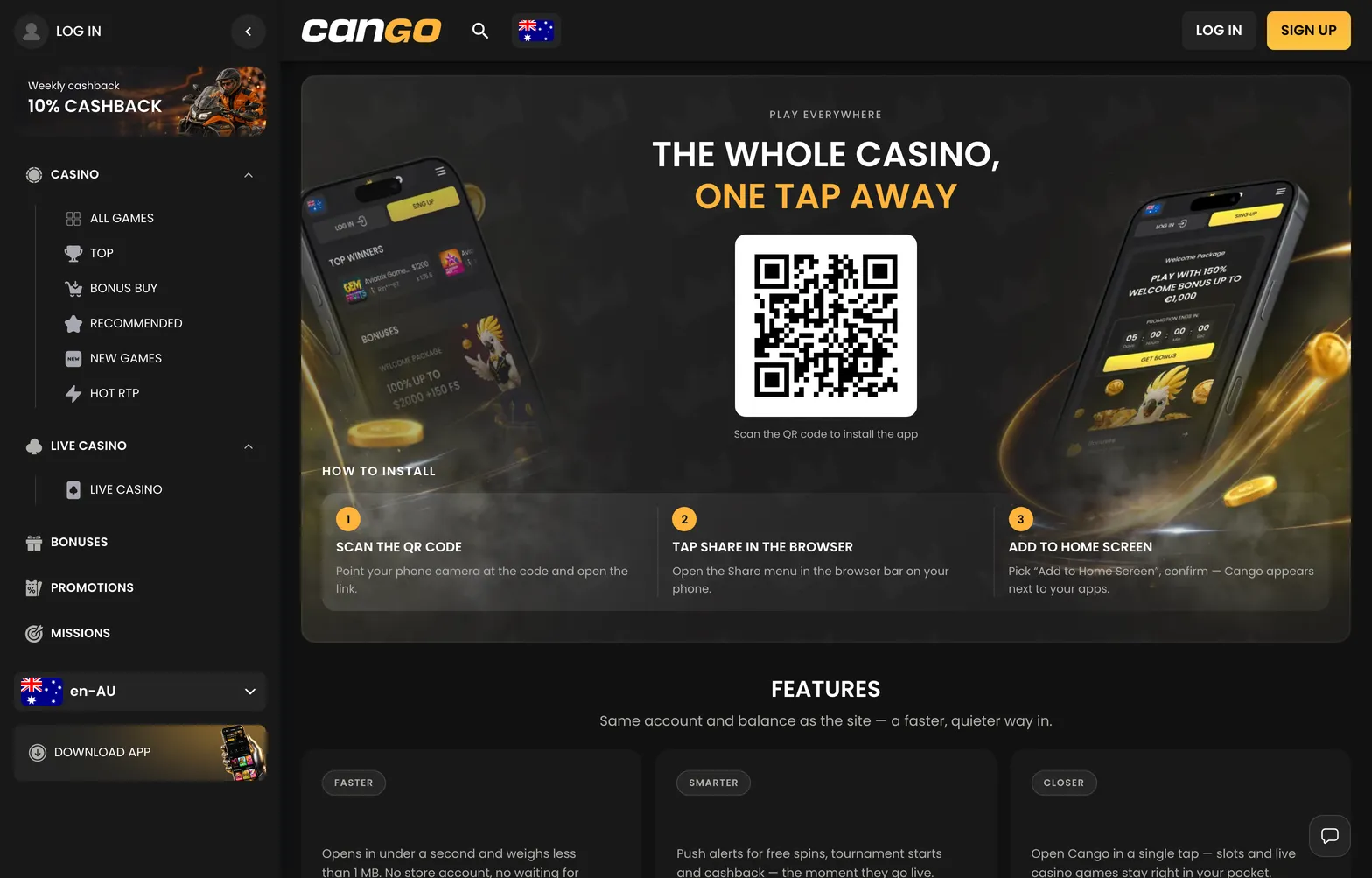
The PWA install screen: add Cango to the home screen and online pokies open full-screen without a store download.

Install 001 cango 1568x1003

Cango online pokies NZ: browser vs app

Kiwi players often search the Apple App Store or Google Play Store looking for a native download, only to come up empty. Cango does not use a store-listed binary app; instead, its mobile platform is built as a Progressive Web App (PWA) alongside standard browser play. Both routes open the full 3,000+ game claim, live chat support, Missions, and cashier, yet they handle screen space and logins slightly differently during daily sessions.

  • Standard mobile browser play: Opening the lobby in Safari on an iPhone or Chrome on an Android phone requires zero installation steps. You type the address or use a bookmark, sign in, and tap any category from Top to Bonus Buy. The downside is that the browser’s address bar and bottom navigation icons stay visible on some devices, trimming a bit of vertical space from tall grid pokies like Sugar Merge Up or Gates of Olympus.
  • Progressive Web App (PWA) shortcut: Installing the PWA puts a dedicated Cango icon right on your phone’s home screen. On an iPhone, you scan the lobby QR code or open the site in Safari, tap the Share button, and choose Add to Home Screen. On Android, you open the browser menu and select Install app or Add to Home screen. Launching from this icon strips away the browser frame so pokies run in a clean, full-screen wrapper.
  • Storage and updates: Because the PWA is essentially a cached web wrapper rather than a heavy native program, it takes up almost no storage on your handset and updates its game tiles automatically every time you connect.
  • Connection and session stability: Whether you launch Cango Egypt slots like Sun of Egypt 3 and Book of Egypt from the PWA icon or directly inside a Chrome tab, your spin results are recorded instantly on the studio’s server. If your mobile data drops mid-spin, reopening either the browser or the PWA restores the round exactly where it paused.

For quick five-minute checks of your weekly cashback badge or daily Missions, the home-screen PWA feels faster because it skips typing URLs and keeps your login session handy. Just remember that Cango strictly bans VPN usage across both browser and PWA connections, and permits only one account per person, household, and device.

Cango online slots: search and filters

Finding a specific game or mechanic inside the lobby relies on three navigation layers: the horizontal category bar, the themed collections row, and the studio filter paired with the search box. Knowing where each filter sits saves you from scrolling endlessly through the All Games feed.

The main category bar divides the catalogue by mechanic and popularity. Top and Recommended highlight high-traffic lobby staples such as Bonanza Billion, Fruit Million, and Elvis Frog TRUEWAYS, while the New tab groups recent additions like Gates of Olympus 1000, Sugar Rush 1000, and Big Bass Splash. Players chasing specific math features can click straight into Bonus Buy (where purchasing a feature typically costs 70x to 100x your base stake in titles like Wanted Dead or a Wild), Hot RTP (featuring games known for solid payout rates like Book of Dead and Sweet Bonanza), or Megaways (housing expanding-reel titles like Buffalo King Megaways and The Dog House Megaways). Classic mechanic fans have dedicated tabs for Book Games, Coins (Hold and Win titles like Gold Express and Coin Volcano), and Fruit Games.

Below or alongside the main tabs sit the seven thematic collections: Asia, Egypt, Jungle, Classic, Mythology, Wild West, and Fishing. These act as visual cross-filters. A game can sit in a mechanic category and a theme collection at the same time; for instance, Book of Egypt appears under Book Games as well as inside the Egypt collection, while Big Bass Bonanza anchors the Fishing collection. If you already know the studio you prefer, open the provider drop-down to isolate BGaming (277 games), Thunderspin (60 games), BGMNG (8), Booongo (5), Playson (2), or Pragmatic Play (2). Finally, the text search bar at the top of the lobby matches partial words in real time, typing “Chillies” or “Coins” immediately pulls up the matching pokie tiles so you can launch a demo or real-money spin in two clicks.

Cango online pokies NZ: common doubts

  • Can I play Cango online pokies NZ directly in my mobile browser?

    Yes, you can access the site directly through any modern mobile browser without needing to download extra software. The interface is responsive, ensuring that your favourite pokies display correctly on different mobile screen sizes.

  • Is it possible to play games in demo mode?

    Most titles in the lobby support a demo mode, allowing you to test the mechanics before playing with real funds. This feature is useful for understanding specific game features like Bonus Buy or volatility levels without risking your bankroll.

  • Does the site support NZD for playing slots?

    Cango does not offer accounts in NZD, so you must select AUD or EUR when registering. Your account balance and all deposit amounts will be reflected with an AUD mark throughout your session.

  • How do I install the mobile app for playing slots?

    The casino provides a PWA, which you can add to your device rather than downloading from an app store. iPhone users should use the Safari Share menu to select Add to Home Screen, while Android users can find the install option in the browser menu.

  • What is the minimum deposit amount to start playing?

    The minimum deposit required to fund your account and start playing is $15 AUD. After the deposit is processed, you gain access to the full lobby to enjoy a wide variety of online slots.